XM Live Contest Entry Guide
Step by step, from opening an account to entering the contest with an XM.com live account.
About this contest
- ●Only XM live accounts (MT5) are eligible. Demo accounts cannot enter.
- ●Eligible account type: the Ultra Low Standard account at XM.com.
- ●Only accounts with 0 credit (bonus) at the start can enter. Accounts that receive credit during the contest are subject to review.
- ●See the contest page for the period, prizes, and entry requirements.
Trade point table
The volume division is ranked by trade points, not by converted lots. Trade points are the total of each closed trade's lot size multiplied by the per-lot points for its symbol.
Eligible symbols: FX (currency pairs), precious metals (gold, silver, etc.) and crypto assets
| Symbol | Points per lot |
|---|---|
| Precious metals (gold, silver, etc.) | 10 pt |
| FX (currency pairs) | 3 pt |
| Crypto assets | 3 pt |
| Stock indices and energy (Cash symbols: JP225Cash#, US500Cash#, OILCash#, etc.) | 0 pt |
| Micro symbols (GOLDm#, GOLDmicro, etc.) | 0 pt |
Not eligible (0 pt): All symbols other than the eligible ones above score 0 pt.
XM.com
Prepare an XM.com account
If you do not have an XM account yet, register through this site's guide link. The partner code is VIPCH.
Open the XM registration pageXM allows one profile per person. If you already use XM.com, do not register again; create an additional account in the members area. Be sure to enter VIPCH in the partner code field. Without it, the account cannot enter the contest.
Choose the Ultra Low Standard account type (MT5)
On the account creation screen, choose MT5 as the platform and Ultra Low Standard as the account type. Accounts where 1 lot is 1,000 units, such as Micro and Ultra Low Micro, are not eligible.
Do not claim any bonus (credit)
Only accounts with 0 credit at the start can enter. Do not claim an account-opening bonus or a deposit bonus. Accounts that receive credit during the contest are subject to review.
Set a read-only password
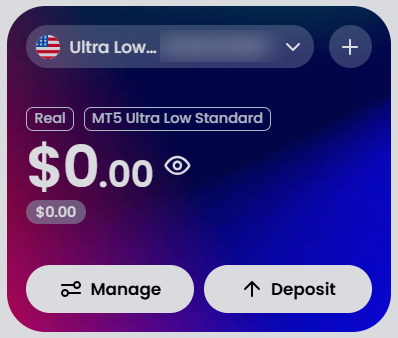
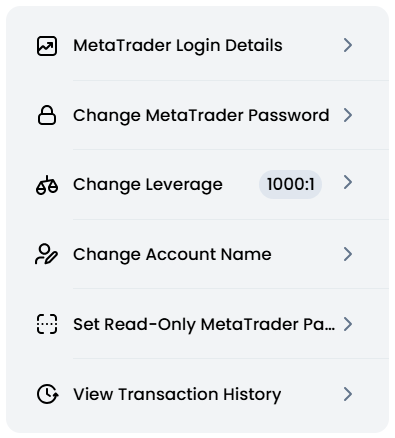
In the XM.com members area, tap "Manage" on the account card, then choose "Set Read-Only MetaTrader Password" and set it to "Trade@contest1", the same for all participants. It is separate from your trading password; never enter your trading password. It is a public shared value so that anyone can check each account read-only from MT5.
Trade@contest1Note the account number and server name
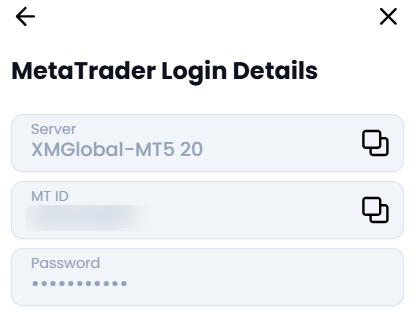
Open "Manage" > "MetaTrader Login Details" to see your account number (MT ID) and server name (e.g. XMGlobal-MT5 20). Enter the server name exactly, including the space.
Enter the contest
On the contest entry screen, enter the account number, server name, read-only password, and account currency, then submit. If you see that the account could not be confirmed, XM may take a few hours up to a day to reflect a new account, so please try again later.
Open the contest listReceive cashback (optional)
If you want cashback, register your account number at ForexCB.com before the contest starts (Nov 17), after opening an account (or an additional account) with VIPCH. Trades closed before you register are not eligible for cashback.
Open ForexCB.com